Skip to content
  • Interlibrary Loan
  • Ask a Librarian
  • Reserve a Room
  • Law Library Blog
  • BYU Law Website
  • ☰
  • Faculty
  • Students
  • BYU Patrons
  • BYU Law Library
  • Attorneys
  • Other Visitors
  • About

Library Services & Information

Internal Use

  • Interlibrary Loan
  • Ask a Librarian
  • Reserve a Room
BYU Law Library

×

  • Library Services & Information
    • Resources for Law Faculty
    • Resources for Law Students
    • Resources for BYU Patrons
    • Resources for Attorneys
    • Resources for Other Visitors
    • About the Library
  Site Search
  • About the Library
    • Facilities Information
      • Library Hours, Holidays and Exceptions
      • Maps and Directions
      • Public Use of the Law Library
      • Law Library Tours
      • Missing Books
      • Lost and Found
      • Gifts and Donations
      • Online Subscriptions
    • Library Organization
      • Library Faculty and Staff
      • Whom to Contact for What
  • More Library Services
    • Site Map & Search
    • Frequently Asked Questions
    • “Ask a Librarian”
    • Privacy Policy
    • Howard W. Hunter
  • Resources for Law Faculty
  • Resources for Law Students
  • Resources for BYU Patrons
  • Resources for Attorneys
  • Resources for Other Visitors

Law Library Announcements

{ this page will contain the blog posts }

Latest Library News

  • Law Student Access to Databases Over the Summer and After GraduationLaw Student Access to Databases Over the Summer and After Graduation
    The end of the school year is here! That means it is time to share information about accessing library databases and other resources while school is out for summer. If you are a not graduating this April, most of your access database remains the same over the summer. But there are a few things you… Read more »
    Published: 3 April 2026 - 11:34 am
  • The Reference Assistant Team for Winter 2026The Reference Assistant Team for Winter 2026
    Say hello to the Reference Assistant Team for the Winter 2026 Semester! These great law students are happy to help you with any of your reference questions! They are hired and overseen by Professor Annalee Hickman Pierson, and they work along side the full-time law library faculty members who offer reference help. Please meet: Matt… Read more »
    Published: 9 March 2026 - 5:07 pm
  • What GenAI Revealed About BYU Law’s Foreign & International CollectionWhat GenAI Revealed About BYU Law’s Foreign & International Collection
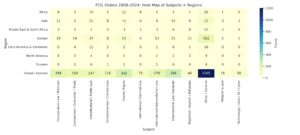
    This year, I took a closer look at the BYU Law Library’s Foreign, Comparative, and International Law (FCIL) collection to better understand its shape—where it’s strongest and where it could grow.re it could grow. A quick look at the heat map makes the pattern easy to spot. Our strongest coverage clusters around Europe and “Global/General”… Read more »
    Published: 20 February 2026 - 4:25 pm
  • Winter Seminar Series: Researching War Crimes, Genocide, & Crimes Against HumanityWinter Seminar Series: Researching War Crimes, Genocide, & Crimes Against Humanity
    Don’t miss the Winter International Criminal Law Research Seminar Series! These sessions are designed to give you hands-on experience with the research tools used by international courts, tribunals, and practitioners working in global justice! Seminar Two: Researching War Crimes, Genocide & Crimes Against Humanity. This session focuses on researching substantive international crimes across tribunals and… Read more »
    Published: 9 February 2026 - 10:04 am
  • Winter International Criminal Law Research Seminar SeriesWinter International Criminal Law Research Seminar Series
    Don’t miss session one of the Winter International Criminal Law Research Seminar Series! These sessions are designed to give you hands-on experience with the research tools used by international courts, tribunals, and practitioners working in global justice. Seminar One: Researching the International Criminal CourtThis session will dive into how to research the International Criminal Court,… Read more »
    Published: 14 January 2026 - 12:29 pm
  • Changes to Bluebook in the New 22nd EditionChanges to Bluebook in the New 22nd Edition
    Last summer, the latest edition of The Bluebook: A Uniform System of Citation was published.  As the most recent edition, it now governs how you should structure you citations in legal memos, briefs, and papers.  The law library has several copies available in either the reserve room or at the reference desk if you would… Read more »
    Published: 7 January 2026 - 1:08 pm
More from Hunter’s Query

Front Page Featured Blocks

Resources

Legal Technology Training

Library-sponsored technology training sessions teach you skills you will use in practice: such as case management systems, e-discovery, trial presentation software, AI tools and more.

Learn More

Law Library Events Calendar

Resources

Interlibrary Loan

The resources don’t stop here. Using Interlibrary Loan, you can request materials from across the nation and around the world.

Make a Request

Front Page Study + Grid

Resources

Exam Study Aids

We provide print and digital access to hundreds of study aids including audio, video, and interactive practice questions to help you succeed in law school.

see all study aids
Aspen Learning LibraryAspen Learning Library QuimbeeQuimbee
LexisNexisLexisNexis WestlawWestlaw

Hours this Week

Library Services

PLEASE NOTE: an authorized ID is required to enter the Law Library after 6pm. Please visit the Public Use Policy page for instructions on how to obtain a BYU ID and after-hours user credentials. Virtual reference is also available.

SaturdayApr 188am – 11pm
SundayApr 19closed
MondayApr 207am – 1am
TuesdayApr 217am – 1am
WednesdayApr 227am – 12am
ThursdayApr 237am – 10pm
FridayApr 248am – 6pm
SaturdayApr 258am – 6pm
SundayApr 26closed
MondayApr 278am – 8pm
TuesdayApr 288am – 8pm
WednesdayApr 298am – 8pm
ThursdayApr 308am – 8pm
FridayMay 18am – 6pm
« previousnext »

Reference Services

Reference librarians and reference assistants are available to help direct patrons to information and resources that may answer their questions or aid in their research.

Please reach out to us if you have questions.

SaturdayApr 1810am – 2pm
SundayApr 19closed
MondayApr 209am – 5pm
TuesdayApr 219am – 10:45am
12pm – 5pm
WednesdayApr 229am – 5pm
ThursdayApr 239am – 5pm
FridayApr 249am – 5pm
SaturdayApr 2510am – 2pm
SundayApr 26closed
MondayApr 279am – 5pm
TuesdayApr 289am – 10:45am
12pm – 5pm
WednesdayApr 299am – 5pm
ThursdayApr 309am – 5pm
FridayMay 19am – 5pm
« previousnext »
*See Library Hours
*See Reference Exceptions

Study Room 144

Study Room 144

This study room may be scheduled by selecting an available time from the grid below.

INSTRUCTIONS: Tap or click on the open time slot you want to reserve. Enter the name of the ‘event’ you are scheduling. Adjust the end time, if desired. (The default duration is 1 hour, but you may reserve up to 2 hrs in 30-minute increments.) If you are asked to designate a category, scroll down to ‘students’. You will need to click therefresh icon at the top right corner of the grid to see your reservation after your request is complete. Use date navigation to view/reserve a room for dates not currently displayed in the grid.

1st Floor Study Room Locations

Micro­forms Area
women's room
men's room
144
150
Custodial Offices


NOTE: You will not be able to see the grid unless you are logged in to the calendaring system. You will need to enable pop-ups for this page in order to login and to use the express schedule

If you don’t see the grid after you log in, click therefresh icon. Log in to http://25live.collegenet.com/pro/byulaw to cancel a reservation you no longer want to use.

Study Room 150

Study Room 150

This study room may be scheduled by selecting an available time from the grid below.

INSTRUCTIONS: Tap or click on the open time slot you want to reserve. Enter the name of the ‘event’ you are scheduling. Adjust the end time, if desired. (The default duration is 1 hour, but you may reserve up to 2 hrs in 30-minute increments.) If you are asked to designate a category, scroll down to ‘students’. You will need to click therefresh icon at the top right corner of the grid to see your reservation after your request is complete. Use date navigation to view/reserve a room for dates not currently displayed in the grid.

1st Floor Study Room Locations

Micro­forms Area
women's room
men's room
144
150
Custodial Offices


NOTE: You will not be able to see the grid unless you are logged in to the calendaring system. You will need to enable pop-ups for this page in order to login and to use the express scheduler.

If you don’t see the grid after you log in, click therefresh icon. Log in to http://25live.collegenet.com/pro/byulaw to cancel a reservation you no longer want to use.

Study Room 274A

Study Room 274A

This study room may be scheduled by selecting an available time from the grid below.

INSTRUCTIONS: Tap or click on the open time slot you want to reserve. Enter the name of the ‘event’ you are scheduling. Adjust the end time, if desired. (The default duration is 1 hour, but you may reserve up to 2 hrs in 30-minute increments.) If you are asked to designate a category, scroll down to ‘students’. You will need to click therefresh icon at the top right corner of the grid to see your reservation after your request is complete. Use date navigation to view/reserve a room for dates not currently displayed in the grid.

NOTE: You will not be able to see the grid unless you are logged in to the calendaring system. You will need to enable pop-ups for this page in order to login and to use the express scheduler.

If you don’t see the grid after you log in, click therefresh icon. Log in to http://25live.collegenet.com/pro/byulaw to cancel a reservation you no longer want to use.

2nd Floor Study Room Locations

274A
274B
274C (Library Office)
274D
274E (Library Office)
274F
274G (Library Office)
274H
Reference Shelves
275
276
reference desk


Study Room 274B

Study Room 274B

This study room may be scheduled by selecting an available time from the grid below.

INSTRUCTIONS: Tap or click on the open time slot you want to reserve. Enter the name of the ‘event’ you are scheduling. Adjust the end time, if desired. (The default duration is 1 hour, but you may reserve up to 2 hrs in 30-minute increments.) If you are asked to designate a category, scroll down to ‘students’. You will need to click therefresh icon at the top right corner of the grid to see your reservation after your request is complete. Use date navigation to view/reserve a room for dates not currently displayed in the grid.

NOTE: You will not be able to see the grid unless you are logged in to the calendaring system. You will need to enable pop-ups for this page in order to login and to use the express scheduler.

If you don’t see the grid after you log in, click therefresh icon. Log in to http://25live.collegenet.com/pro/byulaw to cancel a reservation you no longer want to use.

2nd Floor Study Room Locations

274A
274B
274C (Library Office)
274D
274E (Library Office)
274F
274G (Library Office)
274H
Reference Shelves
275
276
reference desk


Study Room 274D

Study Room 274D

This study room may be scheduled by selecting an available time from the grid below.

INSTRUCTIONS: Tap or click on the open time slot you want to reserve. Enter the name of the ‘event’ you are scheduling. Adjust the end time, if desired. (The default duration is 1 hour, but you may reserve up to 2 hrs in 30-minute increments.) If you are asked to designate a category, scroll down to ‘students’. You will need to click therefresh icon at the top right corner of the grid to see your reservation after your request is complete. Use date navigation to view/reserve a room for dates not currently displayed in the grid.

NOTE: You will not be able to see the grid unless you are logged in to the calendaring system. You will need to enable pop-ups for this page in order to login and to use the express scheduler.

If you don’t see the grid after you log in, click therefresh icon. Log in to http://25live.collegenet.com/pro/byulaw to cancel a reservation you no longer want to use.

2nd Floor Study Room Locations

274A
274B
274C (Library Office)
274D
274E (Library Office)
274F
274G (Library Office)
274H
Reference Shelves
275
276
reference desk


Study Room 274F

Study Room 274F

This study room may be scheduled by selecting an available time from the grid below.

INSTRUCTIONS: Tap or click on the open time slot you want to reserve. Enter the name of the ‘event’ you are scheduling. Adjust the end time, if desired. (The default duration is 1 hour, but you may reserve up to 2 hrs in 30-minute increments.) If you are asked to designate a category, scroll down to ‘students’. You will need to click therefresh icon at the top right corner of the grid to see your reservation after your request is complete. Use date navigation to view/reserve a room for dates not currently displayed in the grid.

NOTE: You will not be able to see the grid unless you are logged in to the calendaring system. You will need to enable pop-ups for this page in order to login and to use the express scheduler.

If you don’t see the grid after you log in, click therefresh icon. Log in to http://25live.collegenet.com/pro/byulaw to cancel a reservation you no longer want to use.

2nd Floor Study Room Locations

274A
274B
274C (Library Office)
274D
274E (Library Office)
274F
274G (Library Office)
274H
Reference Shelves
275
276
reference desk


Study Room 274H

Study Room 274H

This study room may be scheduled by selecting an available time from the grid below.

INSTRUCTIONS: Tap or click on the open time slot you want to reserve. Enter the name of the ‘event’ you are scheduling. Adjust the end time, if desired. (The default duration is 1 hour, but you may reserve up to 2 hrs in 30-minute increments.) If you are asked to designate a category, scroll down to ‘students’. You will need to click therefresh icon at the top right corner of the grid to see your reservation after your request is complete. Use date navigation to view/reserve a room for dates not currently displayed in the grid.

NOTE: You will not be able to see the grid unless you are logged in to the calendaring system. You will need to enable pop-ups for this page in order to login and to use the express scheduler.

If you don’t see the grid after you log in, click therefresh icon. Log in to http://25live.collegenet.com/pro/byulaw to cancel a reservation you no longer want to use.

2nd Floor Study Room Locations

274A
274B
274C (Library Office)
274D
274E (Library Office)
274F
274G (Library Office)
274H
Reference Shelves
275
276
reference desk


Study Room 380B

Study Room 380B

This study room may be scheduled by selecting an available time from the grid below; or select another room to view by clicking on a room number in the map.

3rd Floor Study Room Locations

 
West Carrel Area
Library Shelving
East Carrel Area
Library Shelving
Library Shelving
Zoom Booth #1
Zoom Booth #2
380F
380G
380H
380J
380E
380D
380C
380B
 
men's room
Stairs
 
women's room
Storage
388
1L Carrel Area


INSTRUCTIONS: Tap or click on the open time slot you want to reserve. Enter the name of the ‘event’ you are scheduling. Adjust the end time, if desired. (The default duration is 1 hour, but you may reserve up to 2 hrs in 30-minute increments.) If you are asked to designate a category, scroll down to ‘students’. You will need to click therefresh icon at the top right corner of the grid to see your reservation after your request is complete. Use date navigation to view/reserve a room for dates not currently displayed in the grid.

NOTE: You will not be able to see the grid unless you are logged in to the calendaring system. You will need to enable pop-ups for this page in order to login and to use the express scheduler.

If you don’t see the grid after you log in, click therefresh icon. Log in to http://25live.collegenet.com/pro/byulaw to cancel a reservation you no longer want to use.

Study Room 380C

Study Room 380C

This study room may be scheduled by selecting an available time from the grid below; or select another room to view by clicking on a room number in the map.

3rd Floor Study Room Locations

 
West Carrel Area
Library Shelving
East Carrel Area
Library Shelving
Library Shelving
Zoom Booth #1
Zoom Booth #2
380F
380G
380H
380J
380E
380D
380C
380B
 
men's room
Stairs
 
women's room
Storage
388
1L Carrel Area


INSTRUCTIONS: Tap or click on the open time slot you want to reserve. Enter the name of the ‘event’ you are scheduling. Adjust the end time, if desired. (The default duration is 1 hour, but you may reserve up to 2 hrs in 30-minute increments.) If you are asked to designate a category, scroll down to ‘students’. You will need to click therefresh icon at the top right corner of the grid to see your reservation after your request is complete. Use date navigation to view/reserve a room for dates not currently displayed in the grid.

NOTE: You will not be able to see the grid unless you are logged in to the calendaring system. You will need to enable pop-ups for this page in order to login and to use the express scheduler.

If you don’t see the grid after you log in, click therefresh icon. Log in to http://25live.collegenet.com/pro/byulaw to cancel a reservation you no longer want to use.

Study Room 380D

Study Room 380D

This study room may be scheduled by selecting an available time from the grid below; or select another room to view by clicking on a room number in the map.

3rd Floor Study Room Locations

 
West Carrel Area
Library Shelving
East Carrel Area
Library Shelving
Library Shelving
Zoom Booth #1
Zoom Booth #2
380F
380G
380H
380J
380E
380D
380C
380B
 
men's room
Stairs
 
women's room
Storage
388
1L Carrel Area


INSTRUCTIONS: Tap or click on the open time slot you want to reserve. Enter the name of the ‘event’ you are scheduling. Adjust the end time, if desired. (The default duration is 1 hour, but you may reserve up to 2 hrs in 30-minute increments.) If you are asked to designate a category, scroll down to ‘students’. You will need to click therefresh icon at the top right corner of the grid to see your reservation after your request is complete. Use date navigation to view/reserve a room for dates not currently displayed in the grid.

NOTE: You will not be able to see the grid unless you are logged in to the calendaring system. You will need to enable pop-ups for this page in order to login and to use the express scheduler.

If you don’t see the grid after you log in, click therefresh icon. Log in to http://25live.collegenet.com/pro/byulaw to cancel a reservation you no longer want to use.

Study Room 380E

Study Room 380E

This study room may be scheduled by selecting an available time from the grid below; or select another room to view by clicking on a room number in the map.

3rd Floor Study Room Locations

 
West Carrel Area
Library Shelving
East Carrel Area
Library Shelving
Library Shelving
Zoom Booth #1
Zoom Booth #2
380F
380G
380H
380J
380E
380D
380C
380B
 
men's room
Stairs
 
women's room
Storage
388
1L Carrel Area


INSTRUCTIONS: Tap or click on the open time slot you want to reserve. Enter the name of the ‘event’ you are scheduling. Adjust the end time, if desired. (The default duration is 1 hour, but you may reserve up to 2 hrs in 30-minute increments.) If you are asked to designate a category, scroll down to ‘students’. You will need to click therefresh icon at the top right corner of the grid to see your reservation after your request is complete. Use date navigation to view/reserve a room for dates not currently displayed in the grid.

NOTE: You will not be able to see the grid unless you are logged in to the calendaring system. You will need to enable pop-ups for this page in order to login and to use the express scheduler.

If you don’t see the grid after you log in, click therefresh icon. Log in to http://25live.collegenet.com/pro/byulaw to cancel a reservation you no longer want to use.

Study Room 380F

Study Room 380F

This study room may be scheduled by selecting an available time from the grid below; or select another room to view by clicking on a room number in the map.

3rd Floor Study Room Locations

 
West Carrel Area
Library Shelving
East Carrel Area
Library Shelving
Library Shelving
Zoom Booth #1
Zoom Booth #2
380F
380G
380H
380J
380E
380D
380C
380B
 
men's room
Stairs
 
women's room
Storage
388
1L Carrel Area


INSTRUCTIONS: Tap or click on the open time slot you want to reserve. Enter the name of the ‘event’ you are scheduling. Adjust the end time, if desired. (The default duration is 1 hour, but you may reserve up to 2 hrs in 30-minute increments.) If you are asked to designate a category, scroll down to ‘students’. You will need to click therefresh icon at the top right corner of the grid to see your reservation after your request is complete. Use date navigation to view/reserve a room for dates not currently displayed in the grid.

NOTE: You will not be able to see the grid unless you are logged in to the calendaring system. You will need to enable pop-ups for this page in order to login and to use the express scheduler.

If you don’t see the grid after you log in, click therefresh icon. Log in to http://25live.collegenet.com/pro/byulaw to cancel a reservation you no longer want to use.

Study Room 380G

Study Room 380G

This study room may be scheduled by selecting an available time from the grid below; or select another room to view by clicking on a room number in the map.

3rd Floor Study Room Locations

 
West Carrel Area
Library Shelving
East Carrel Area
Library Shelving
Library Shelving
Zoom Booth #1
Zoom Booth #2
380F
380G
380H
380J
380E
380D
380C
380B
 
men's room
Stairs
 
women's room
Storage
388
1L Carrel Area


INSTRUCTIONS: Tap or click on the open time slot you want to reserve. Enter the name of the ‘event’ you are scheduling. Adjust the end time, if desired. (The default duration is 1 hour, but you may reserve up to 2 hrs in 30-minute increments.) If you are asked to designate a category, scroll down to ‘students’. You will need to click therefresh icon at the top right corner of the grid to see your reservation after your request is complete. Use date navigation to view/reserve a room for dates not currently displayed in the grid.

NOTE: You will not be able to see the grid unless you are logged in to the calendaring system. You will need to enable pop-ups for this page in order to login and to use the express scheduler.

If you don’t see the grid after you log in, click therefresh icon. Log in to http://25live.collegenet.com/pro/byulaw to cancel a reservation you no longer want to use.

Study Room 380H

Study Room 380H

This study room may be scheduled by selecting an available time from the grid below; or select another room to view by clicking on a room number in the map.

3rd Floor Study Room Locations

 
West Carrel Area
Library Shelving
East Carrel Area
Library Shelving
Library Shelving
Zoom Booth #1
Zoom Booth #2
380F
380G
380H
380J
380E
380D
380C
380B
 
men's room
Stairs
 
women's room
Storage
388
1L Carrel Area


INSTRUCTIONS: Tap or click on the open time slot you want to reserve. Enter the name of the ‘event’ you are scheduling. Adjust the end time, if desired. (The default duration is 1 hour, but you may reserve up to 2 hrs in 30-minute increments.) If you are asked to designate a category, scroll down to ‘students’. You will need to click therefresh icon at the top right corner of the grid to see your reservation after your request is complete. Use date navigation to view/reserve a room for dates not currently displayed in the grid.

NOTE: You will not be able to see the grid unless you are logged in to the calendaring system. You will need to enable pop-ups for this page in order to login and to use the express scheduler.

If you don’t see the grid after you log in, click therefresh icon. Log in to http://25live.collegenet.com/pro/byulaw to cancel a reservation you no longer want to use.

Study Room 380J

Study Room 380J

This study room may be scheduled by selecting an available time from the grid below; or select another room to view by clicking on a room number in the map.

3rd Floor Study Room Locations

 
West Carrel Area
Library Shelving
East Carrel Area
Library Shelving
Library Shelving
Zoom Booth #1
Zoom Booth #2
380F
380G
380H
380J
380E
380D
380C
380B
 
men's room
Stairs
 
women's room
Storage
388
1L Carrel Area


INSTRUCTIONS: Tap or click on the open time slot you want to reserve. Enter the name of the ‘event’ you are scheduling. Adjust the end time, if desired. (The default duration is 1 hour, but you may reserve up to 2 hrs in 30-minute increments.) If you are asked to designate a category, scroll down to ‘students’. You will need to click therefresh icon at the top right corner of the grid to see your reservation after your request is complete. Use date navigation to view/reserve a room for dates not currently displayed in the grid.

NOTE: You will not be able to see the grid unless you are logged in to the calendaring system. You will need to enable pop-ups for this page in order to login and to use the express scheduler.

If you don’t see the grid after you log in, click therefresh icon. Log in to http://25live.collegenet.com/pro/byulaw to cancel a reservation you no longer want to use.

Study Room 388

Study Room 388

This study room may be scheduled by selecting an available time from the grid below; or select another room to view by clicking on a room number in the map.

3rd Floor Study Room Locations

 
West Carrel Area
Library Shelving
East Carrel Area
Library Shelving
Library Shelving
Zoom Booth #1
Zoom Booth #2
380F
380G
380H
380J
380E
380D
380C
380B
 
men's room
Stairs
 
women's room
Storage
388
1L Carrel Area


INSTRUCTIONS: Tap or click on the time open time slot you want to reserve. Enter the name of the ‘event’ you are scheduling. Adjust the end time, if desired. (The default duration is 1 hour, but you may reserve up to 2 hrs in 30-minute increments.) If you are asked to designate a category, scroll down to ‘students’. You will need to click therefresh icon at the top right corner of the grid to see your reservation after your request is complete. Use date navigation to view/reserve a room for dates not currently displayed in the grid.

NOTE: You will not be able to see the grid unless you are logged in to the calendaring system. You will need to enable pop-ups for this page in order to login and to use the express scheduler.

If you don’t see the grid after you log in, click therefresh icon. Log in to http://25live.collegenet.com/pro/byulaw to cancel a reservation you no longer want to use.

Zoom Booth #1

Zoom Booth #1

This booth may be scheduled by selecting an available time from the grid below; or select another location by clicking on the link in the map.

3rd Floor Study Room Locations

 
West Carrel Area
Library Shelving
East Carrel Area
Library Shelving
Library Shelving
Zoom Booth #1
Zoom Booth #2
380F
380G
380H
380J
380E
380D
380C
380B
 
men's room
Stairs
 
women's room
Storage
388
1L Carrel Area


INSTRUCTIONS: Tap or click on the time open time slot you want to reserve. Enter the name of the ‘event’ you are scheduling. Adjust the end time, if desired. (The default duration is 1 hour, but you may reserve up to 2 hrs in 30-minute increments.) If you are asked to designate a category, scroll down to ‘students’. You will need to click therefresh icon at the top right corner of the grid to see your reservation after your request is complete. Use date navigation to view/reserve a room for dates not currently displayed in the grid.

NOTE: You will not be able to see the grid unless you are logged in to the calendaring system. You will need to enable pop-ups for this page in order to login and to use the express scheduler.

If you don’t see the grid after you log in, click therefresh icon. Log in to http://25live.collegenet.com/pro/byulaw to cancel a reservation you no longer want to use.

Zoom Booth #2

Zoom Booth #2

This booth may be scheduled by selecting an available time from the grid below; or select another location by clicking on the link in the map.

3rd Floor Study Room Locations

 
West Carrel Area
Library Shelving
East Carrel Area
Library Shelving
Library Shelving
Zoom Booth #1
Zoom Booth #2
380F
380G
380H
380J
380E
380D
380C
380B
 
men's room
Stairs
 
women's room
Storage
388
1L Carrel Area


INSTRUCTIONS: Tap or click on the time open time slot you want to reserve. Enter the name of the ‘event’ you are scheduling. Adjust the end time, if desired. (The default duration is 1 hour, but you may reserve up to 2 hrs in 30-minute increments.) If you are asked to designate a category, scroll down to ‘students’. You will need to click therefresh icon at the top right corner of the grid to see your reservation after your request is complete. Use date navigation to view/reserve a room for dates not currently displayed in the grid.

NOTE: You will not be able to see the grid unless you are logged in to the calendaring system. You will need to enable pop-ups for this page in order to login and to use the express scheduler.

If you don’t see the grid after you log in, click therefresh icon. Log in to http://25live.collegenet.com/pro/byulaw to cancel a reservation you no longer want to use.

Test Page

Carrel Use Policy

Students at the J. Reuben Clark Law School are expected to comply with all the requirements of the CES Honor Code, the Dress and Grooming Standards, and the standards of conduct established for the legal profession. These include “maintain[ing] the highest standards in their personal conduct regarding honor, integrity, morality, and consideration of others … ‘at all times and in all things, and in all places’.” To foster a professional atmosphere, demonstrate respect for others, and protect the Law School’s large financial investment in providing each student with a personal space conducive to study, BYU Law Students are expected to comply with the following rules:

  1. Noise: Noise should be kept to a minimum in the carrel areas and in the library at large. Conversations should be conducted quietly and in locations that do not disturb others.
    1. Group and extended conversations are appropriate only in study rooms, the Rex E. Lee Conversation & Popular Reading Room and outside the library.
    2. Cellular phones should be silenced or placed on vibration within the library, and all telephone, Skype, Zoom, Facetime, or other video/web chat conversations should be conducted outside the library or in the Rex E. Lee Conversation & Popular Reading Room
  2. Decorations: To maintain a professional atmosphere, avoid damage to carrels and chairs (and the expense of refinishing) and for other aesthetic reasons, all carrel decorations should be conducive to “an atmosphere consistent with the ideals and principles of The Church of Jesus Christ of Latter-day Saints” (BYU Honor Code).
    1. Decorations must be kept within the confines of the assigned carrel space. Unoccupied carrels may not be decorated.
    2. Nothing may be stored or displayed on top of or underneath your carrel, on the outside carrel walls, or on building walls next to carrels.
    3. The library strongly recommends decorations not be physically affixed to the carrels, but any decorations a student chooses to affix may only be attached using non-permanent, residue-less methods. Students will be billed for any damage or marking to the carrel from the use of any adhesive materials (including those claimed to be safe) or other method of attachment.
  3. Furnishings: Safety regulations (such as campus and municipal fire codes) prohibit the placing of unauthorized chairs, equipment, or personal furniture in the carrel areas.
    1. Library chairs are provided for each carrel. These chairs may not be replaced without written approval from the Law School Dean of students and the Student Services Librarian. Chair cushions may be used to improve personal comfort.
    2. Appliances such as: refrigerators, microwaves, personal coolers, hot plates, crockpots, lamps, personal heaters, or other electrical devices (other than 1 computer monitor) are absolutely prohibited in the law library carrels. Any appliances found on the premises may be confiscated by library staff without prior notice to the carrel occupant.
    3. Other items (including but not limited to standing desks, sofas, fans, personal trash cans, etc.) are also prohibited in the carrel areas, unless previous authorization has been given. All such items must be pre-approved in writing by the Dean of Students and the Student Services Librarian.
    4. Library furniture (including, but not limited to soft-seating, study room chairs, and items from the Rex E. Lee Conversation & Popular Reading Room) may not be rearranged or moved to the carrel areas.
  4. Food and Drink: May be consumed by a law student in the library at his/her assigned carrel and under the following conditions:
    1. No food or drink is to be consumed in the stacks at any time.
    2. Only law students can consume food within the law library premises, and then only at the student’s assigned carrel. For this reason, any food or drink carried into the library should be concealed.
    3. Additionally, food or drink consumption should be discreet. Group festivities of any kind do not meet this condition and should be moved to the student lounge or other similar locations outside of the library.
    4. Smelly food of any kind is prohibited in the library.
    5. All evidence of food and drink must be cleared afterwards. Cleaning supplies are available at the circulation desk. Students will be held liable for any damage to library materials, furnishings or premises resulting from the transportation, storage, and/or consumption of food or drink.
  5. Penalties:
    1. Lost Carrel Key/Not returned at end of occupancy charge:       $50.00
    2. End of occupancy carrel cleaning and removal of belongings charge:  $25.00
    3. Missing/Damaged ethernet cable charge:               $5.00
  6. Violations: of Food & Drink, Noise, Decorations or Furnishing Policies:
    1. 1st time: Warning
    2. 2nd time: Meet with Library Administrator
    3. 3rd time: Loss of carrel privileges

Group Study Room Policies

Reserve a Study Room
  • Be considerate of your fellow students at all times.
  • The study rooms are intended to be used by groups consisting of two or more law students. Career Development may reserve a limited number of study rooms for on-campus interviews at non-peak times during a semester.
  • Study groups must occupy a room within 15 minutes* of their scheduled reservation, or lose their reservation for that hour.
    (*This requirement does not apply to reservations for TA office hours. TA reservations may not be challenged until ALL study rooms on ALL library floors are otherwise occupied.)
  • Unoccupied study rooms are available on a first-come, first-served basis to any group of two or more law students.
  • Using his or her Route Y ID; a law student may reserve a study room on behalf of a group for up to 120 minutes per day. As a courtesy to the community, groups are asked to leave at least 60 minutes between separate reservations in the same room by members of the same study group.
  • Law students may not reserve rooms on behalf of friends or relatives.
  • Complaints about study room monopolization should be directed to the SBA leadership.

Note: Room 388 has been designated as a study room. This room does not have a speaker installed. With the door closed, the occupants may not hear library or building announcements.

(NOTICE: Law School and Library staff have the right to enter any study room at any time and for any reason.)

Reserve a Study Room

Contact Information:

For questions about the study room policy or to report monopolization of a study room, contact the SBA by sending a message to “sbaweb@law.byu.edu.”

For concerns about how the program is functioning, please contact Melanie Chao through email.

Circulation:801-422-3593
Reference:801-422-6658


Maps & Directions

Carrel Occupancy Agreement

Howard W. Hunter Law Library

J. Reuben Clark Law School

I, _____________________________________, agree and understand that my occupancy of a carrel is conditioned upon compliance with the terms stated below and may be terminated at any time, with or without cause. I also agree that I will be financially liable for any damages to the carrel resulting from my occupancy of it and acknowledge that failure to pay for damages may affect the receipt of my law school diploma and/or certification to take the bar exam.

Key Principles

  • The primary purposes of the Law Library are to provide resources for legal research and a location for scholarship and study. These purposes are best accomplished in a clean, orderly, and quiet environment.
  • As a courtesy, the Law Library has made study carrels available to assist students in their academic endeavors.
  • Occupancy of a study carrel is a privilege, not a right. Inherent in this privilege are important obligations:

Terms

As a condition of carrel occupancy, I promise to conduct myself in a manner that is in harmony with the primary purposes of a library and bolsters an environment conducive to learning and study. By signing this agreement, I acknowledge that I must abide by the following rules:

§1. ______ I understand that I am responsible for maintaining the carrel in a clean and orderly condition, suitable for a professional work environment. I agree to thoroughly clean the carrel before checking out at the end of occupancy. I recognize that a $25 fine will be assessed for the cleaning and removal of items left in my carrel at the end of occupancy.
§2. ______ I agree to immediately report any existing damage to the carrel and its surrounding area by email to chaom@law.byu.edu. I also agree to report any damage or deterioration due to normal wear and tear as soon as it becomes apparent. I understand all carrels are inspected following check-out, and that I will be liable for any damage outside of normal use.
§3. ______ I understand that an approved Law Library chair is provided for each carrel, and that no other furnishings are permitted (see “furnishings” in the policies on the back of the form). If I require special accommodations for ADA or medical reasons, I will seek prior approval (in writing) from the Law School’s Dean of Students and the Student Services Librarian.
§4. ______ I agree to keep all books, decorations, personal belongings, and food consumption within the confines of the carrel assigned to me. I understand that any objects placed on top of the cabinets, or around or underneath the carrel assigned to me may be removed and taken to Circulation’s Lost & Found.
§5. ______ I agree that the library staff has the right to inspect all carrels (including locked portions) at any time without notice. I acknowledge that I need not be present for an inspection to occur.
§6. ______ I will treat my fellow students, library and law school employees, faculty, and others with respect; and I will cooperate in whatever manner requested to maintain a professional working environment.
§7. ______ I understand that penalties may be imposed for violations of this Agreement, which includes the Carrel Use Policy on the next page of the form. I understand that ongoing disregard of these policies may result in the loss of carrel privileges for the duration of the current academic year, or denial of privileges for future years.
§8. ______ I understand that I am responsible for the cleaning out and returning of the carrel key on time. I understand that these fines may not be waived and if not paid may affect the receipt of my law school diploma and/or certification to take the bar exam.

By signing this form, I accept all the terms of this Agreement, including the Carrel Use Policy printed on the back of the form.

Signed: ___________________________________ Date: _________________ 

Report a Carrel Problem (or give feedback)

Thank-you for letting us know of any problems you are having with your carrel. Please use this form to report non-urgent problems. For urgent concerns, such as electrical malfunctions or water leaks, please contact the circulation desk immediately (801-422-3593).

Library Directory

Administration


Law Library Director

Shawn G. Nevers

277B JRCB | 801.422.8784

Law Library Deputy Director

Iantha Haight

277A JRCB | 801.422.9023

Administrative Assistant

Maureen Holman

277 JRCB | 801.422.7475

Circulation


Access Services Librarian

Melanie Coleman

256B JRCB | 801.422.3656

Student Services and Outreach

Melanie Chao

294 JRCB | 801.422.9052

Collection Maintenance Assistant

Marilyn Porter

256 JRCB | 801.422.7474

Collection Maintenance


Collection Maintenance Assistant

Marilyn Porter

256 JRCB | 801.422.7474

Public Services


Senior Law Librarian

Kory D. Staheli

274A JRCB | 801.422.9223

Head of Reference and Faculty Services

Annalee Hickman Pierson

274E JRCB | 801.422.3596

Legal Technology Librarian

Nick Hafen

277A JRCB | 801.422.2658

Foreign, Comparative, and International Law Librarian

Kristen Clarke Kellems

274G JRCB | 801.422.7472

Technical Services


Acquisitions Librarian / Head of Technical Services

Bonnie R. Geldmacher

260B JRCB | 801.422.3572

Cataloging Specialist

Andrea Howard

260A JRCB | 801.422.1632

Serials Librarian and Data Project Manager

Teresa Odam

260C JRCB | 801.422.3571

Library and Networked Information Systems


Head of Infrastructure and Technology

David L. Armond

396 JRCB | 801.422.4258

LNIS Manager & Programmer

Mark Harris

459K JRCB | 801.422.9050

Systems and Digital Content Librarian

Garrett Blazzard

260D JRCB | 801.422.6657

Howard W. Hunter

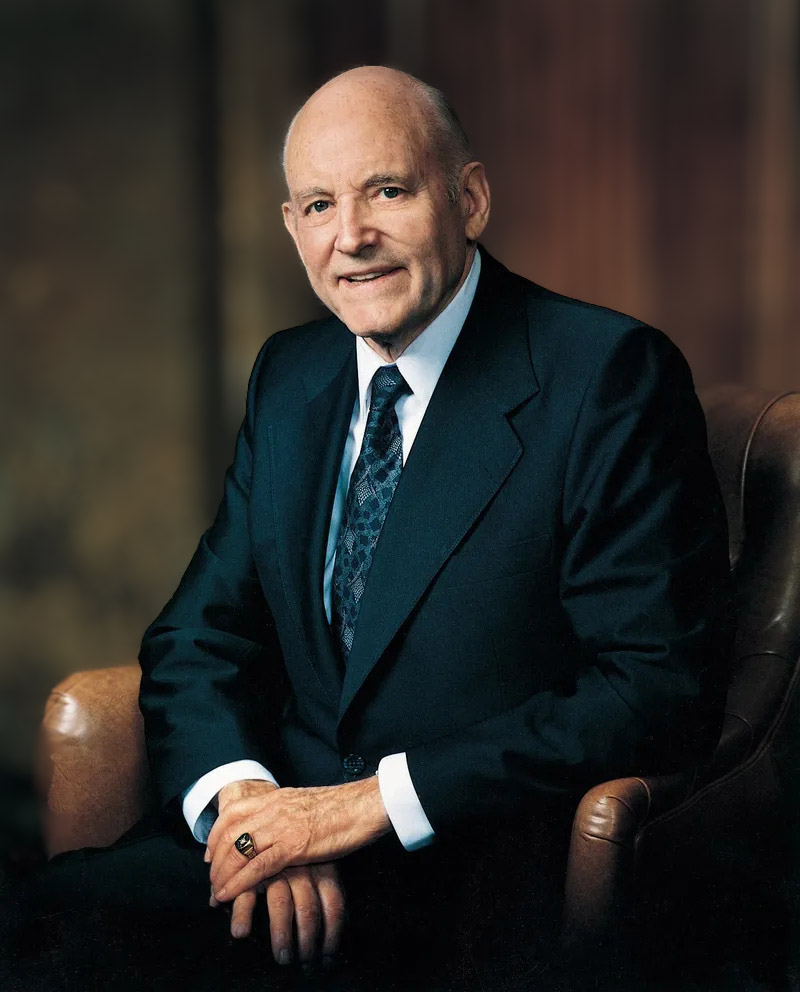
Howard W. Hunter (1907-1995) was the 14th President of The Church of Jesus Christ of Latter-day Saints, and is the only attorney ever to have served in that role.

As an attorney, President Hunter “… was known for his integrity, precise thinking, clear communications, and sense of fairness. He was also known as a “people lawyer”.… Howard was much more concerned about seeing that people got the help they needed than that he got compensated for it.

From The Life and Ministry of Howard W. Hunter
Official Portrait of Howard W. Hunter

“President Hunter has stood as a highly visible example to all of the lawyers and law students who know him or know of him — and they number in the tens of thousands. He epitomizes the practice of law in the classic style: honor, ethical conduct, courtesy, gentility, the art of making the adversarial system work while sticking to the rules, and — though I list it last, I think of it as a component of first importance — integrity.”

~ John S. Welch,
quoted in the March, 1991 issue of the Ensign

Contact the Law Library

Send Us a Message

Construction Closure Summer 2024

The BYU Law Library has limited space and access to library materials during construction this summer in 2024 and will be locked and closed to the public beginning April 29, 2024, until further notice (likely until fall semester begins). 

BYU Law Students: Please see your email for instructions on how to access the library and study carrels.

People outside the BYU Law Community, including non-law BYU students and faculty, attorneys, and local community patrons may request an exception for access to use our library materials. A request for access can be made using this form. Note that requesting access does not guarantee you access, and requests will only be granted for access to use our specialized library materials. Access for any other reason will not be granted (e.g. space to study and work, etc.). A decision regarding your request may take up to a full business day. Access, if granted, will always be brief, limited, and short-term (less than 2 hours) and will require an appointment made with a Reference Services employee to enter the library to use the access you’ve been granted.  

For access to physical materials that are located on the 2nd floor, access will not be immediate.
As a religiously affiliated law school, the development of moral character and enlightened devotion to the rule of law are hallmarks of a BYU Law School education.

BYU Law Library, 274 JRCB
Brigham Young University
Provo, Utah 84602

Directions >

Circulation:  801-422-3593
Reference:  801-422-6658
BYU Law:  801-422-4274

Contact Us >


BYU Law Digital Library

Foreign & Int'l Law Directory

HeinOnline Alumni Access

Free & Low Cost Utah Legal Resources


Harold B. Lee Library

Renew Materials

Classic Catalog Search

Library Info Site Map

   Twitter

   Facebook

   Youtube

© Brigham Young University   |   All Rights Reserved

Privacy Policy   |   Help & Feedback