Reference services are available to help direct patrons to information and resources that may answer their questions or aid in their research. Be advised that library policy prohibits reference employees from doing research for patrons or answering specific legal questions; however, they can direct patrons to relevant sources and give instruction on their use.
The physical Reference Desk is located on the main floor of the Library, and reference services are also offered virtually. Reference services are provided by both full-time law library faculty members and part-time law student reference assistants. If you need a full-time librarian’s assistance, you should make an appointment to guarantee their availability by emailing reference@law.byu.edu. Simply state in the email that you would like an appointment with a librarian, what your research need is, and a few times (between 9am and 5pm Monday through Friday) that would work for you to have the appointment.
The following are methods for contacting the reference employees virtually:
Email
You may email us your reference question or schedule an appointment at reference@law.byu.edu. For public patrons, we will attempt to answer reference questions within two business days, and we remind you that we cannot offer legal advice; we can provide answers to brief, factual research questions and resource inquiries. For example, we can help identify and locate legal materials or provide guidance in using legal resources or tools.
Call
To receive reference services by talking with a reference employee over the phone, call 801-422-6658. If a reference employee does not answer, feel free to leave a voicemail because it is checked regularly.
Legal Advice and Help from an Attorney
The BYU Law Library employees, both the full-time librarians and the law student part-time assistants, cannot offer legal advice. We are also not practicing attorneys and cannot take on your case and cannot contact attorneys on your behalf. We are here to connect you with legal resources that we have in our library and can provide you guidance in using them. You will have to use the resources yourself and determine what may or may not help you with your research or legal problem.
We have a web page where we keep a list of free and low-cost legal resources in Utah that we are made aware of. You may peruse that page, and some of those resources will have attorneys that you may contact. Here is the link: https://guides.law.byu.edu/legal-resources. We are not affiliated with any of the resources on this web page, and you will want to contact the resource directly to confirm the accuracy of information.
Guide to Free & Low-Cost Legal Resources in Utah
We have a web page where we keep a list of free and low-cost legal resources in Utah that we are made aware of. You may peruse that page, and some of those resources will have attorneys that you may contact. Here is the link: https://guides.law.byu.edu/legal-resources. We are not affiliated with any of the resources on this web page, and you will want to contact the resource directly to confirm the accuracy of information.
Library Resources for the Public
Westlaw Patron Access
Westlaw Patron Access is a version of Westlaw open to the public. It is available on two of the three computers that are currently open to the public near the Reference Desk. Westlaw Patron Access allows access to all federal and state cases and statutes, KeyCite, ALR, and AmJur (plus many different parts of the AmJur series, like Forms and Causes of Action).
Use of the Patron Access terminal is limited to 30 minutes when someone else is waiting.
Electronic Resources
Patrons who visit the Law Library in person can access some Law Library electronic resources, such as Westlaw, depending on our contract with the database vendor. Public access to many main campus (Lee Library) databases is also available to visitors in the Law Library. For questions about access to specific databases, please contact Reference Services. Remote (from home) access to Law Library databases is not available to visitors, although some databases are available remotely to Utah attorneys and BYU Law alumni. For information about access to HeinOnline’s Law Journal Library for BYU Law alumni, click here. For information about access to the LexisNexis Digital Library (Lexis treatises such as Nimmer on Copyright, the Utah Code Annotated, and more) for Utah attorneys and BYU Law alumni, click here.
Utah Court Briefs
The Utah Court Briefs collection contains public record briefs submitted to the Utah Supreme Court and Utah Court of Appeals and supplied to the University of Utah and BYU Law Libraries by the Courts for the purposes of legal scholarship and academic research. The Law Libraries offer this collection as a public service encouraged by the Utah Courts. For additional information, please contact the Repository Administrator at hunterlawlibrary@byu.edu.
The judicial opinions (case decisions) based on the briefs in this Digital Commons collection may often be found at the Utah Courts website or by using the Google Scholar case law search. Basic legal research information is available through the BYU Law Library’s libguides, as well as the BYU and UofU Law Libraries’ onsite print and electronic resources (click the library links for details about library programs, resources, reference hours, and directions). Reference assistance is available for visitors to both libraries.
Xchange (Utah District Court Documents)
The Law Library has access to Xchange, which is a Utah-government-owned and created database that provides access to Utah state district (trial) court dockets and documents, including traffic citations in Utah.
How to Access Xchange at the BYU Law Library
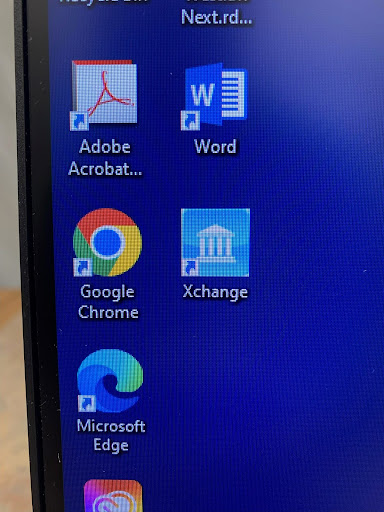
If you are not a law student or faculty, you may access Xchange on one of the three legal research computers on the main floor of the Law Library by the Reference Desk. There is an icon on the desktop of these legal research computers for Xchange. It looks like this:
When you click the icon, login credentials will need to be entered in so that you can log in, and you’ll need to ask an employee at the Reference Desk to log you in. Reference hours are listed here so that you know when a good time to come into the library is.
Other Places to Access Xchange
Patrons can call their local Utah state district court buildings to see if they have a Public Access Xchange Terminal. The law library at the University of Utah has free access, as well as the Matheson Courthouse in Salt Lake City.
Library Spaces for Research and Studying
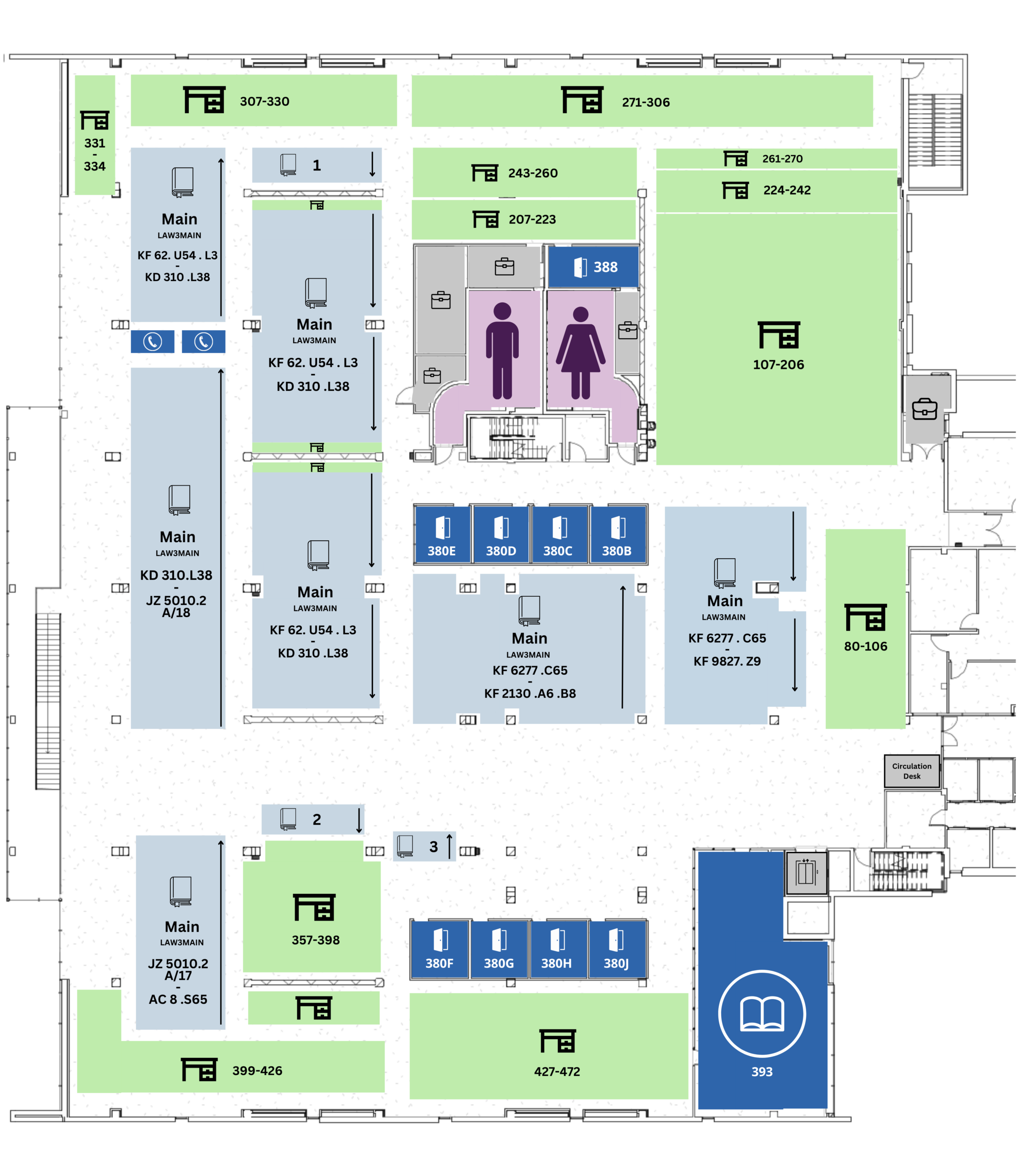
Members of the public are welcome to use the library and its resources on the second (main) floor of the library. Materials can be retrieved from the first and third floors, but tables, study rooms, Zoom booths, and carrels on these floors are restricted to current law students, faculty, and staff.
Public Library Collection
How to Find a Book in the BYU Law Library
The BYU Law Library can be a little tricky finding some books because we have many library collections within the three floors of the BYU Law Library. Each collection has the books listed alphabetically and then numerically, so once you are in the correct collection, it is fairly simple to find the book you need. Getting to the correct collection could be more difficult. Follow these steps to help you find your book:
Step 1: Find the book listed on our law library website. Go to the law library’s main search bar at lawlibrary.byu.edu to search for the book. (This is our library “catalog.”)
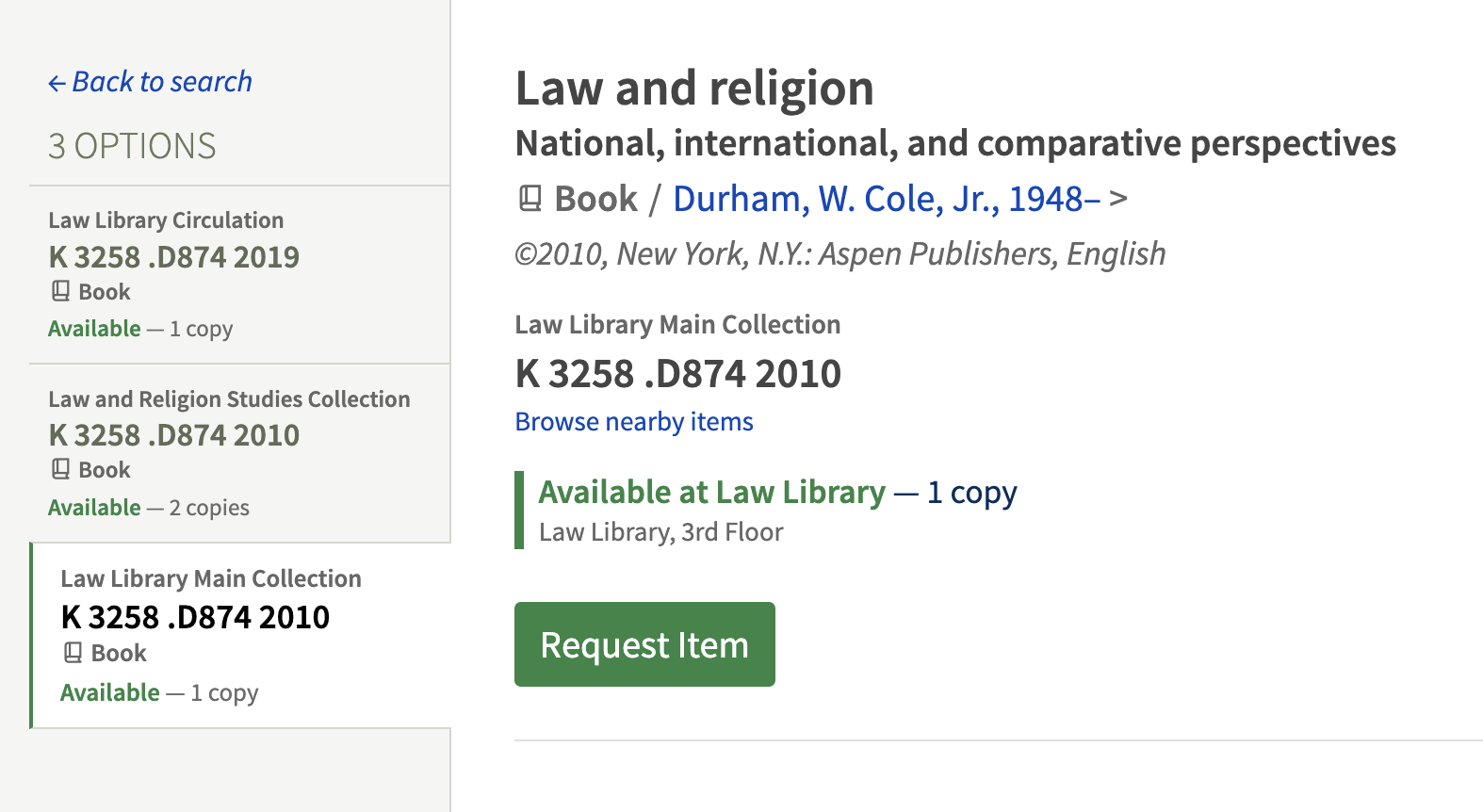
Step 2: Check all the “holdings” for the book to ensure you are finding the year and edition you want. “Holdings” is the library word for all the places where this book may be held/located, as we may have multiple copies of the book, or multiple editions of the book. The holdings show up on the lefthand side when you are looking at a book in the catalog. In the screenshot example below, there are three holdings for the book, two first edition books from 2010 and one second edition book from 2019.
Step 3: Gather the relevant information about the book to find it more easily; simply having the call number or the title is not enough. Take a screenshot or a picture of all the information included in the screenshot above: title of the book, the author, the year it was published (Ensure you are looking at the year/edition you want for the book.) the library collection name (in gray) (This is crucial information you need!), the call number for the book (a letter and numbers in black), and where the book is available (in green) and which floor (in light gray).
In the screenshot above, the title is “Law and Religion: National, International, and Comparative Perspectives.” The author is “W. Cole Durham, Jr.” The year it was published is 2010. The library collection name is the “Law Library Main Collection.” The call number is “K 3258 .D874 2010.” The book is available at the Law Library on the 3rd floor. All this information will help you find the book more easily.
Step 4: Figure out which library collection has your book. Most of the BYU Law Library is the library collection called “Law Library Main Collection.” However, we have lots of library collections inside our library; the rest of the collections are just smaller and do not contain that many books. Some of the other library collections at the BYU Law Library that you might see listed in gray for other books include “Law Library Reserve,” “Law and Religion Studies Collection,” “Law Library Govt. Documents,” and “Law Library Self Help Collection.”
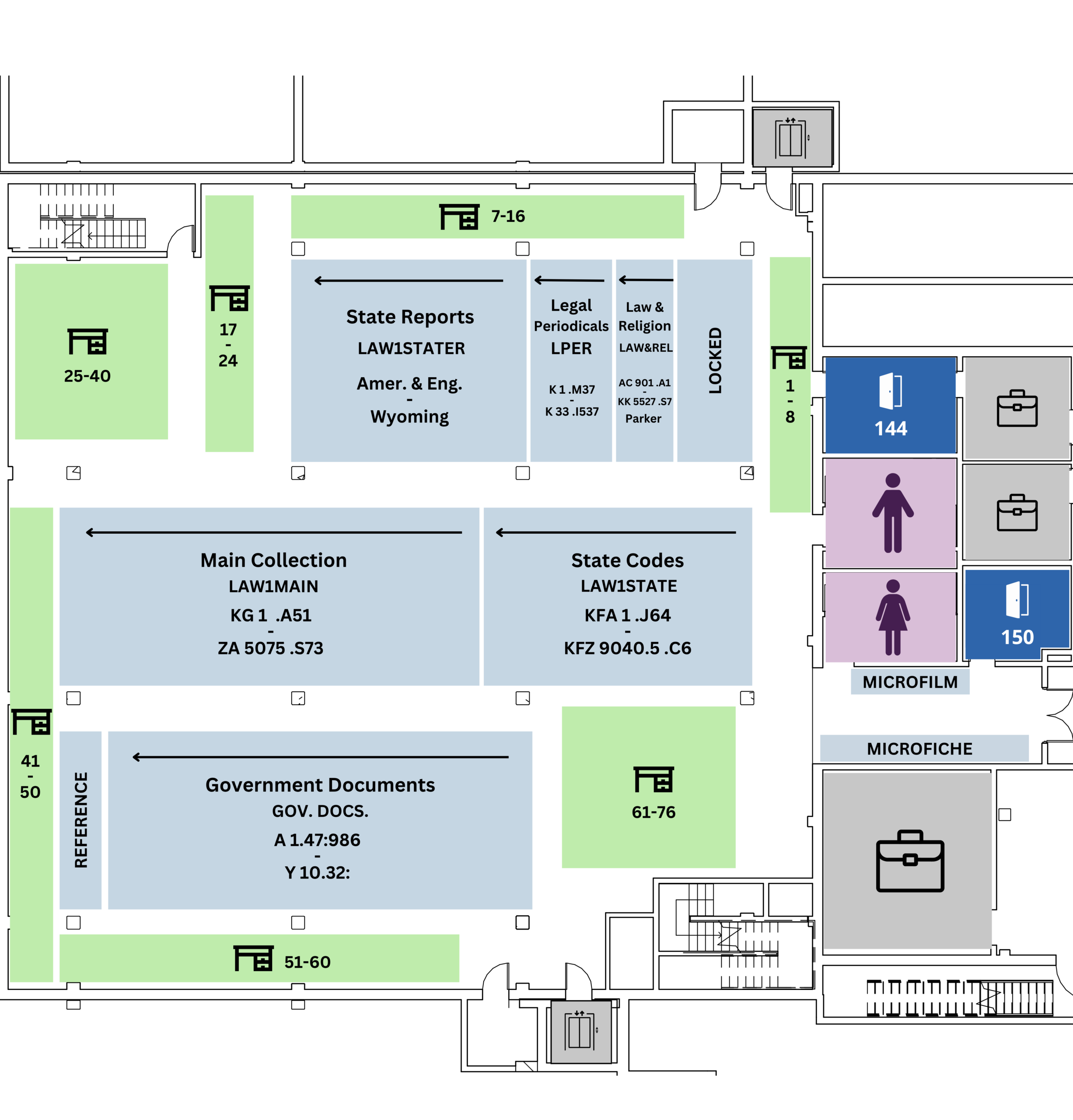
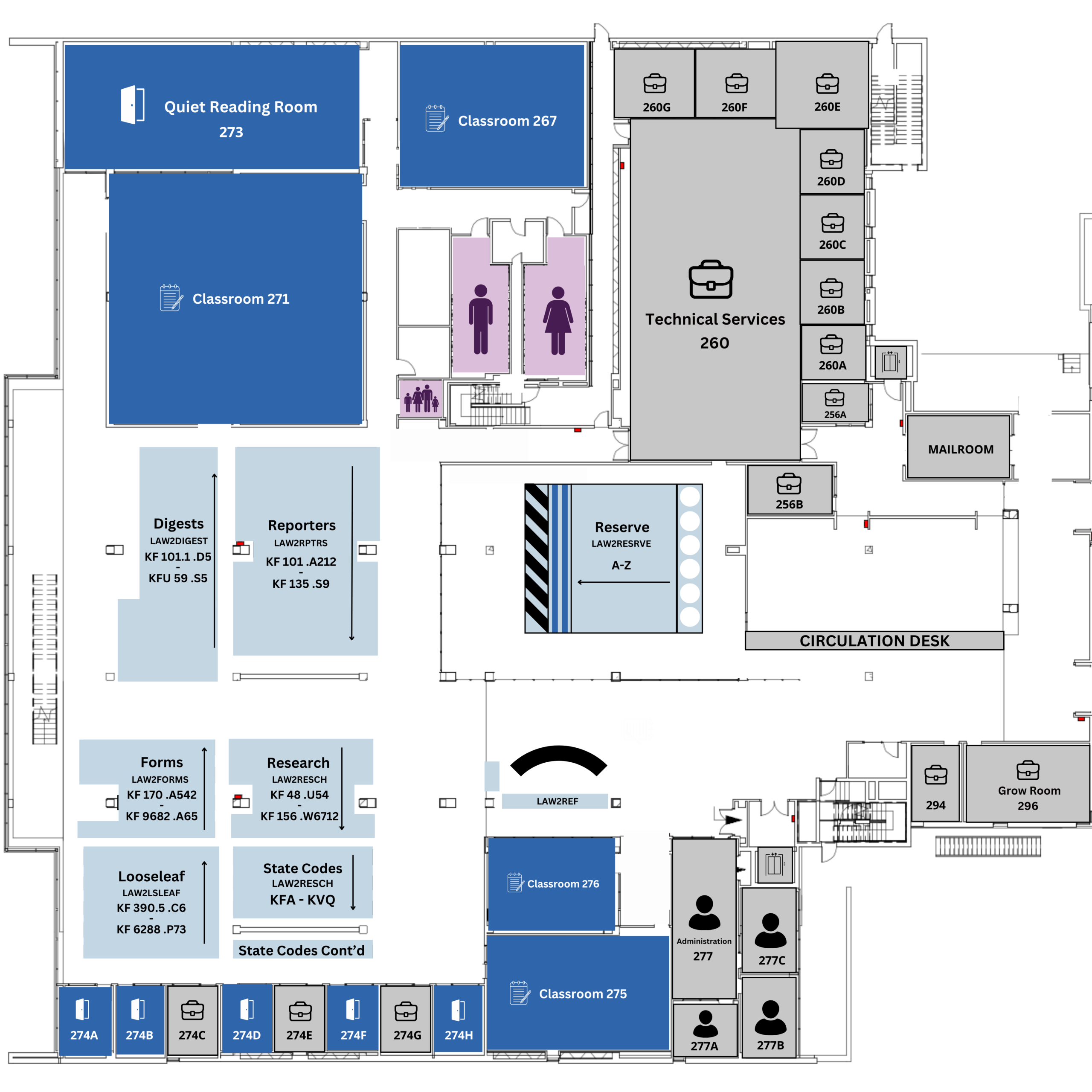
Step 5:Use the library maps. Choose the library map for the floor listed in light gray in your screenshot to find where the library collection you need is located. The library maps are linked on the law library website here. Note that the main floor / ground floor of the BYU Law Library is the second floor. The first floor is the basement. There is also a third floor of the library. Look to see where the collection is located; then go scouting. The ends of the shelves have labels to say which range of call numbers are on that aisle of shelves, and the books are all alphabetically and then numerically in order within the collection.
If your light gray listing for which floor says “Law Library, Reserve Room 2nd Floor (280 JRCB)” then the map may not list the library collection name; instead, you will go to the “Reserve Room” on the map. Once in the Reserve Room, you can look on the signs on the ends of the shelves to find the library collection you are looking for. The same is true for light gray listings for the Circulation Desk. The rest of the collections should be listed on the maps.
Step 6:You either successfully found the book (yay!), or you may need to ask a library service point, like Reference Services or the Circulation Desk for assistance. For Reference Services, you can call (801) 422-6658, email reference@law.byu.edu, or visit the physical Reference Desk on the second floor (which is the main floor of the law library) for help. A link to the book on our website is always helpful to share with them so that they have all the relevant information for finding the book. For reference hours, see here. You may also visit the Circulation Desk at the law library main entrance for help finding a book if Reference Services is not available.
Missing Books: If you cannot find the book after trying these steps and talking with a library service point employee, the book may be missing. You may follow the “Missing Books” steps on this webpage to request that a search for the missing book take place.
Note: Most call numbers for law library books begin with KF, which is the category for “law.” So any call number in the “Law Library Main Collection” before KF is in the northwest corner of the 3rd floor of the law library. Anything after KF that are in the “Law Library Main Collection” tends to be on the 1st floor (the basement floor) of the law library.
Library Floor Maps
NOTE: Please contact Circulation/ILL to request any item that is unavailable.
First Floor (basement)
The first floor of the library houses documents from federal and state governments, as well as selected legal periodicals. Please ask Reference for assistance in locating specific records.
Second Floor (main)
The main floor of the library contains primary legal materials generated by federal and state governments, finding aids, selected secondary resources and items on reserve. The public Westlaw and HeinOnline computers are near the reference desk. Reference Assistants, located at the desk near these resources, can provide training on the use of the available digital and print collections.
Third Floor
The Law Library’s circulating book collection is shelved on the third floor. This floor is also the location of most law student personal study spaces. Non-students should avoid disturbing anyone who is studying, and must not remain on this floor any longer than is necessary to locate the books needed for their research. Circulating books may be carried to the main floor of the library where public study tables are provided for non-student patrons, or checked out from the Circulation Desk (also located on the main/ground floor).
Borrowing Privileges for Students in Utah
Students and faculty of Utah universities and colleges whose libraries are members of the Utah Academic Library Consortium may check materials out from the Law Library after setting up a Community Patron Account. Please contact Melanie Coleman for information on how to set up an account. Circulating items check-out for 3 weeks.
Members of the general public may not borrow materials but are welcome to use Law Library resources while on the premises. We provide scanners for patron use.
Rare Books
Materials located in the Rare Book Room are available to patrons from 8am-5pm, Monday through Friday. Patrons, including BYU faculty, should contact the Reference Desk for help accessing materials from the Rare Book Room. A librarian will locate the book and bring it to the patron in the Law Library Reserve Room next to the Circulation Desk. Patrons are not permitted to remove any items from the Rare Book Room from the Reserve Room. The book will be checked out to the patron during use. Patrons must return all materials from the Rare Book Room to the circulation clerk when finished.
BYU Law Digital Repository
The BYU Law Digital Repository contains open access copies of the scholarly works of Law School faculty, annual reports and other official publications, and the online archives of the various legal journals published at BYU Law.
Open-access consortia seek to make high-quality academic work available throughout the world at minimal cost to students, academics and scholars of all levels. The full archives of the BYU Law Review, BYU Journal of Public Law, BYU Education and Law Journal, and BYU International Law & Management Review are available through the Law Review Commons. Other publications such as the Clark Memorandum, Advocate (and annual reports), Life in the Law and the scholarly works published by Law School Faculty are all accessible to researchers through the more-expansive Law Commons. The Digital Commons network includes works from all areas of scholarly and academic inquiry, and contains millions of individual articles produced at hundreds of universities.
Digital Repository Readership
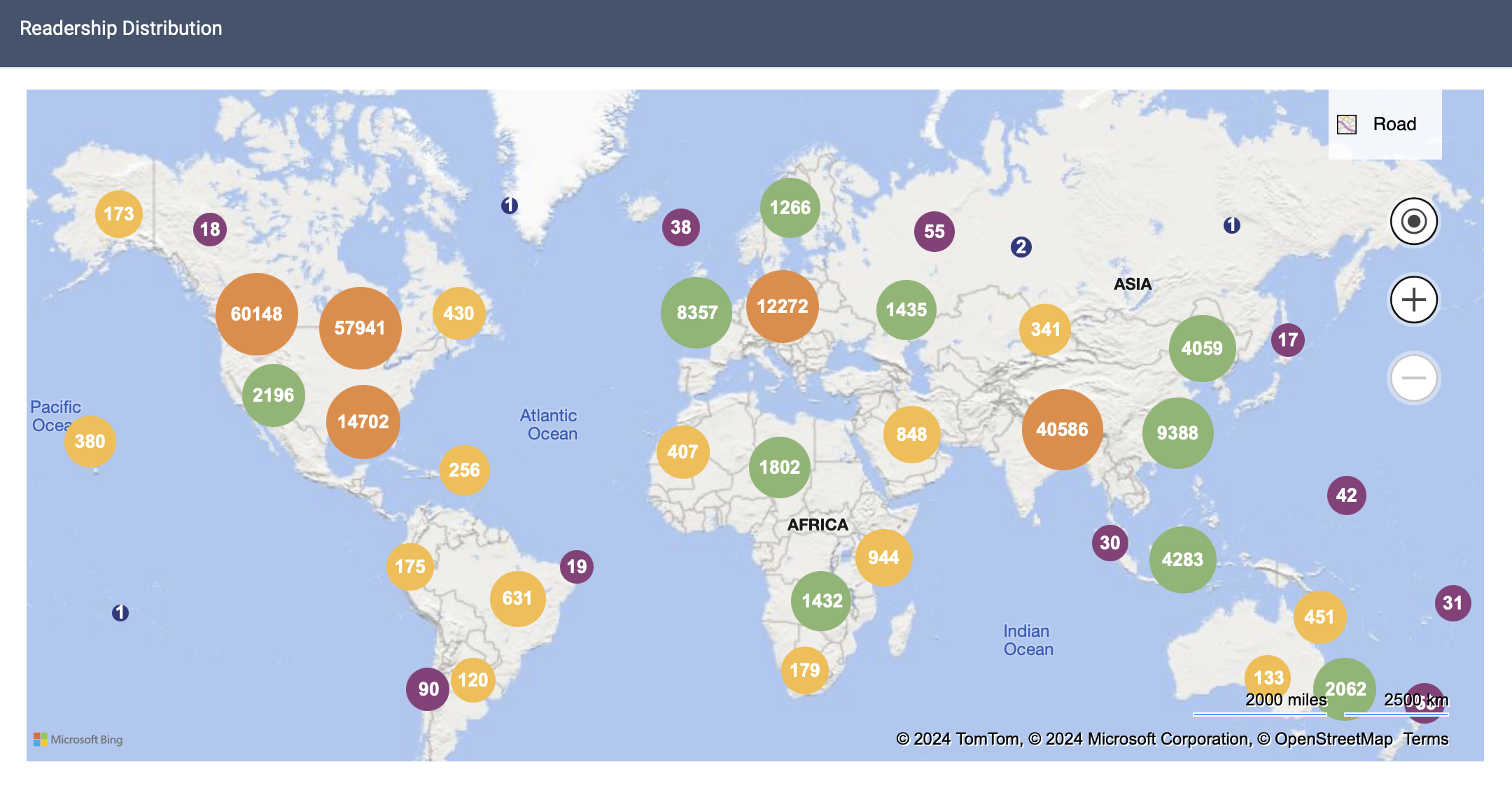
Scholarly articles and other works uploaded to the repository by BYU Law have accessed and downloaded almost 3.5 million times since the repository was established. We average over 750,000 downloads/year from over 200 countries/regions by thousands of institutions and individuals.
A map displaying readership activity for the first 6 months of 2024. ≫
Library Technology for the Public
Computers for Legal Research
The Library has installed a limited number of legal research computers near reference for general public access. Resources such as Westlaw Patron Access and HeinOnline are available, as well as selected CCH and ProQuest Databases. Please ask a reference employee for assistance in accessing these resources.
Please be aware that we no longer have public-access printers, so results need to be saved to email or a USB drive.
Scanning
The Law Library does not have any printers available for public patrons. The Law Library provides document scanners, which allow the option of saving a document as a PDF to save and print at home, for use by the BYU Law school community and for use by public patrons who are scanning library materials. If you need an on campus printing option, BYU has several Print Centers or Printer Kiosks across campus.
The Y App can help you find the closest pharos printer. The Print and Mail website provides more information about these options.
The copyright law of the United States (Title 17, U.S. Code) governs the making of photocopies or other reproductions of copyrighted material. The person using the equipment is liable for any infringement.
Please note that scanning all or even a substantial portion of a book in order to avoid purchasing a copy is not a Fair Use (see § 107(4)).
Scanned PDFs may be saved to USB flash drives, uploaded to cloud-based systems like your own Google Drive, Box, or Dropbox account, or emailed using web-based accounts such as Yahoo or Gmail.
Scanner Locations
The Law Library currently has:
two KIC Bookeye open-face scanners (the newer one near the Reference Desk and the older one in the Reserve Room);
four flatbed book scanners (2 near the Reference Desk on the 2nd floor, 1 in the Reserve Room, and 1 on the 3rd floor near the Rex E. Lee room); and
two multi-page feed scanners (1 near the wall that at the end of the table has the reference co-op printer and another on the 3rd floor near the Rex E. Lee room).
Employees at the Circulation and Reference are trained and ready to assist anyone in the BYU Law community who needs help with scanning and anyone from the public who needs help scanning library materials.
Microform
Copies of documents on microform can be made as digital scans on the public computer in the Microform area (first floor). Patrons may email those scans on that computer to themselves.
Printing
The law library does not offer printing services for BYU students that are not affiliated with the law school or public patrons. Please visit the Lee Library or Cougar Creations for your printing needs.
BYU Law provides Co-Op printers for BYU Law students. To learn more about the cost, how to install it and use it, see the BYU Law page on Co-Op printing.